Templates & import
Every document starts from the create button on Home, the square with a pencil: a blank document of any size, a photo, a scan or a file you already have. Or skip the menu and tap a template — their folders sit right under Recents.
The create menu
- New Document asks for a name and a page size, then opens an empty page. ⌘N does the same on the Mac.
- Camera takes a photo and puts it on a page exactly its size. It shows only on a device with a camera, so not on the Mac.
- Photo Album does the same with a picture from your library.
- Scan Document opens the document scanner and makes one page per scanned page, each sized to its scan. Not on the Mac.
- Import from Files opens a Pixara file, or turns an SVG, a PDF or an image into a document. What each one becomes is below.
- On the Mac, every new document asks where to save it, like Pages: the panel opens in the folder you used last, the Pixara folder the first time, and Cancel creates nothing. On iPhone and iPad a new document goes to iCloud Drive › Pixara.
New Document
- Size is the page in pixels, from 4 to 4096 on each side. The arrows next to it swap width and height, which is how you turn a portrait page into a landscape one.
- Lock proportions keeps the shape while you type: change the width and the height follows.
- Transparent background starts the page with no colour behind it, instead of white.
- Templates, at the bottom, are fifteen preset sizes. Tap one and the size fills in; the name follows too, unless you have already typed your own.
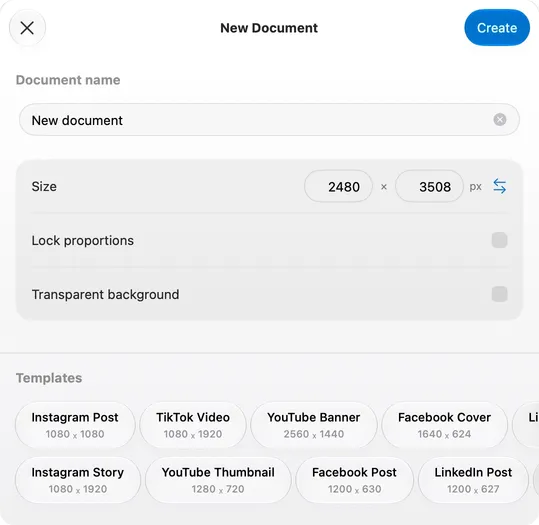
| Preset | Size (px) |
|---|---|
| Instagram Post | 1080 × 1080 |
| Instagram Story | 1080 × 1920 |
| TikTok Video | 1080 × 1920 |
| YouTube Thumbnail | 1280 × 720 |
| YouTube Banner | 2560 × 1440 |
| Facebook Post | 1200 × 630 |
| Facebook Cover | 1640 × 624 |
| LinkedIn Post | 1200 × 627 |
| LinkedIn Banner | 1584 × 396 |
| App Icon | 1024 × 1024 |
| A4 | 2480 × 3508 |
| Presentation | 1920 × 1080 |
| Business Card | 1050 × 600 |
| Flyer | 1414 × 2000 |
| Brochure | 2112 × 1632 |
Without a preset you get A4, 2480 × 3508. A blank document is one empty page of that size, white or transparent, with the grid off.
Templates on Home
- A dozen folders, under Recents — Basic, Instagram Story, Instagram Post, book covers in portrait and landscape, Poster, Newsletter, Curriculum Vitae, mockups and wallpapers for phone and desktop — with close to two hundred templates between them.
- On iPad and Mac they are rows in the sidebar, under Templates, each with its count. On iPhone they are the chips above the grid.
- Tap a template and the document is created and opened at once; on the Mac it first asks where to save it.
- Templates come from our server. The folders refresh in the background, and a template is downloaded when you tap it, so that step needs a connection. If the folders cannot load, Retry tries again.
Taking a template apart
- Tap, then tap in. The first tap selects the element on the page under your finger, a whole card or group; the next one goes straight to what is inside it.
- Open Layers — on iPhone, the Elements list — to see how the page is built, nested exactly as it is drawn.
- Duplicate a page (⇧⌘D, or the pages panel) to make the next one. The copy is already linked to the original for Magic Move, so moving things on it is an animation when you present.
Import from Files
| Format | What you get |
|---|---|
| .pixara | The document, opened where it is — a project folder, the Desktop, Files — not copied; your edits save into that file, and it stays in Recents. A read-only file, or one in the Trash, comes in as a copy. |
| Older Pixara files (.pixd, .pix) | A .pixd opens as a document with all its pages; a .pix, a single page, as a one-page document. |
| SVG | One page of editable vectors, from files up to 2 MB and 500 elements. |
| One page per PDF page, up to 100, each a picture of that page rather than editable text. | |
| Image | A document with one page the size of the picture, the picture on it. |
Import from Files is in the create menu; on the Mac, File › Open… (⌘O) does the same from Home. You can also drop files straight onto Home.
- A .pixara opens from anywhere. Double-click it in the Finder or tap it in Files and it opens where it is. One that arrives by Mail or AirDrop comes in as a copy.
- Dropped on a page instead, files are added to the document you are in: an image lands as a photo, an SVG as vectors, a PDF as pictures, one per page, up to ten.