Freeform & vectors
A freeform is a shape you own point by point. Anything can become one — a rectangle, a star, a word, a drawing, a logo you only have as a PNG — and a freeform can hold other elements, so it doubles as a group with a custom outline.
What a freeform is
- Points. Drag a point to move it. Right-click or long-press the outline for Add Point Here and Remove Point Here; the ⊕ and ⊖ in the small toolbar above the selection, or ⌘] and ⌘[, add and remove one point at a time.
- Smoothness, in the inspector (Curve on iPhone), rounds the whole outline at once and brings out the curve handles — drag one to bend its segment. Points sets how many there are, up to 400, and Reduce Points in the menu thins a busy outline.
- Everything a shape has, a freeform has: fill, gradient, stroke, dash, shadow, opacity, blur.
- Open or closed. Open Path turns the outline into a stroked path; Close Path makes it a shape again.
Six ways to make one
| From | How | You get |
|---|---|---|
| A shape | Edit › Convert to Freeform, or the button in the inspector | The same rectangle, circle, triangle, ellipse, star or diamond, as editable points. |
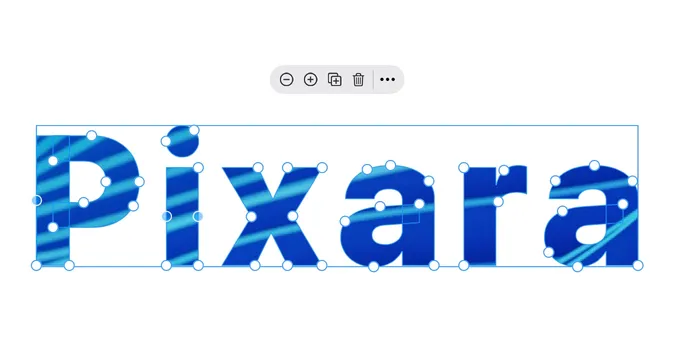
| Text | Edit › Convert to Freeform, up to 250 characters | Every letter as a path: a wordmark you can stretch, cut into, or fill with a photo. |
| An image | Edit › Convert to Vector | Your picture, or an SF Symbol, traced into freeforms on the device. Best on logos, icons and flat artwork. |
| A drawing | Edit › Convert to Freeform | Your pencil strokes as vector shapes. |
| A line or path | Edit › Convert to Path, then Close Path | A line becomes a path with points; closing it makes a shape. |
| From scratch | Path, in the creation bar or Essentials | A path with a few points to drag where you want them; close it when it is done. |
Convert to Vector works on pictures you added yourself and on SF Symbols, not on the stickers and icons from Elements.
A freeform is a group
- Drag elements into it the way you drag into any container — hold still over it — and they are clipped to its outline and move with it. A photo inside a blob, a portrait inside an arch, a title inside a ribbon.
- Convert to Freeform Group takes a group with something in it and gives it four corner points; pull them into any silhouette and everything inside stays put and clipped.
- Merge Paths joins two or more lines, paths or freeforms into one compound shape — where the outlines overlap, the overlap is cut out, so a circle inside a circle makes a ring. Unmerge Freeform splits it again.
When to rasterize
A traced logo can carry a lot of points. Once it looks right, Rasterize turns it into a flat image that is cheap to move and copy around; keep a vector copy to the side if you might edit it again.